
JSON-LD is a syntax for writing schema.org markup as a block of structured data in a page’s code, so a machine reader can identify things like an article’s author, publish date or a page’s listed questions without parsing prose. It is a page-level readiness signal, not a proven way to get a page cited by an AI system. This article gives the real, validated markup for the schema types that matter most for AI, AEO and GEO readiness, and explains what each field does.
This is the implementation half of a two-part answer on this site. Does structured data actually help AI citations? covers the conceptual question of whether schema causes an AI system to cite a page, and the honest answer there is that it doesn’t, not provably. This article doesn’t re-argue that. It starts from the position that article established: structured data is a legitimate page-level readiness signal worth getting right, separate from any citation outcome, and here is exactly how to write it correctly.
What JSON-LD Actually Is
Schema.org is a shared vocabulary: a set of agreed names for things (an Article, a Person, a Question) and their properties (a headline, an author, a datePublished). JSON-LD is one way to write that vocabulary into a page, as a block of plain JSON inside a <script type="application/ld+json"> tag. Two other syntaxes exist, Microdata and RDFa, both written as attributes scattered through the visible HTML. JSON-LD has become the standard choice because it sits in one place, doesn’t touch the visible markup, and is simple to generate programmatically. This article only covers JSON-LD.
The important distinction to hold onto through the rest of this article: schema.org defines what a property means. Google’s own documentation defines which of those properties it currently recognises and treats as required or recommended for a specific feature. The two lists overlap heavily but are not identical, and a property can be valid schema.org markup while being irrelevant to Google’s own systems.
Which Schema Types Actually Matter Here
Schema.org lists hundreds of types. For a typical content or blog page aiming at AI, AEO and GEO readiness, four are worth knowing well:
- Article or BlogPosting: identifies a page as a piece of written content, with a named author, a publication date and an update date. The single most broadly useful type for a content site.
- FAQPage: marks up a set of question-and-answer pairs that already exist as visible content on the page. Covered in detail below, including why its old Google rich-result UI no longer exists.
- Organization: identifies the business or publisher behind a site, tying a name to a canonical URL, logo and set of external profiles.
- Person: identifies an individual author, usually nested inside an Article’s
authorproperty rather than used on its own.
HowTo is also in scope for this article’s title, and gets its own short section below, because the honest, researched answer is that it is largely not worth a dedicated template any more.
Article/BlogPosting Schema: The Template to Implement
Google’s own Article structured data documentation states plainly that there are no strictly required properties for Article-type markup; everything is recommended, applied where it fits the content. BlogPosting is a subtype of Article in schema.org’s hierarchy and inherits the same properties rather than defining its own, so the template below applies to either type.
{
  "@context": "https://schema.org",
  "@type": "BlogPosting",
  "headline": "How to Reduce Cart Abandonment on a Shopify Store",
  "image": [
    "https://www.example.com/images/cart-abandonment-featured.jpg"
  ],
  "datePublished": "2026-03-04T09:00:00+00:00",
  "dateModified": "2026-10-12T11:30:00+00:00",
  "author": {
    "@type": "Person",
    "name": "Jordan Blake",
    "url": "https://www.example.com/authors/jordan-blake"
  },
  "publisher": {
    "@type": "Organization",
    "name": "Example Organization",
    "logo": {
      "@type": "ImageObject",
      "url": "https://www.example.com/logo.png"
    }
  },
  "mainEntityOfPage": "https://www.example.com/blog/reduce-cart-abandonment/"
}
Replace every value above with your own details before using it; the names, dates and URLs are illustrative only.

| Field | What it does for a machine reader |
|---|---|
headline |
States the article’s title as data, not just as visible text, so a system doesn’t have to guess which heading on the page is the real title. Google recommends keeping it concise, since long titles may be truncated. |
image |
Points to a representative image. Google’s guidance asks for a crawlable, indexable URL in a supported format, ideally with more than one resolution and aspect ratio supplied. |
datePublished |
States the first publication date in ISO 8601 format, with a timezone. This is how a system knows how old the content is without inferring it from a visible date string that might be formatted inconsistently. |
dateModified |
States the most recent substantive update, separate from the publish date. This is the field that tells a reader whether “freshness” claims on the page are actually backed by a real edit, not just a changed year in a footer. |
author.name |
Names the author as plain text. Google’s documentation is specific here: use only the name, not a job title, the publisher’s name, or an introductory phrase like “posted by.” |
author.url |
Links to a page that identifies the author uniquely, such as an author bio page. sameAs can be used instead, pointing to an external profile. |
publisher |
Names the organisation or person who published the piece, distinct from who wrote it. |
mainEntityOfPage |
Explicitly ties the Article object to the specific URL it appears on, schema.org’s intended way of saying “this is the article that this page is about.” |
FAQPage Schema: The Template to Implement
FAQPage markup wraps a set of questions and answers that are already visible as real content on the page, using mainEntity (inherited from schema.org’s base Thing type) to hold an array of Question objects. Each Question carries its wording in name and nests an acceptedAnswer of type Answer, which carries the answer text in text.
{
  "@context": "https://schema.org",
  "@type": "FAQPage",
  "mainEntity": [
    {
      "@type": "Question",
      "name": "Do I need JSON-LD schema for a page to appear in AI Overviews or ChatGPT answers?",
      "acceptedAnswer": {
        "@type": "Answer",
        "text": "No. Google's own documentation for AI Overviews and AI Mode states there is no special schema.org structured data required to appear in those features."
      }
    }
  ]
}
Worth stating plainly: the Google rich result this schema used to produce is gone. Google’s own changelog confirms the FAQ rich result stopped appearing in Search between 8 May and 15 June 2026, and the documentation page was removed outright. If your reason for adding FAQPage schema in 2026 is to get the expandable FAQ box back in Google’s results, that box no longer exists for any site. The markup is still entirely valid; it just has no Google SERP feature attached to it any more. What it still does is give any machine reader an unambiguous, pre-parsed list of a page’s questions and answers, rather than asking it to infer which bold text is a question.
Organization Schema: The Template to Implement
Organization schema identifies the entity behind a site: a name, a canonical URL, a logo, and a set of external reference pages that collectively disambiguate who the organisation actually is.
{
  "@context": "https://schema.org",
  "@type": "Organization",
  "name": "Example Organization",
  "url": "https://www.example.com",
  "logo": "https://www.example.com/logo.png",
  "sameAs": [
    "https://www.linkedin.com/company/example-organization",
    "https://en.wikipedia.org/wiki/Example_Organization"
  ],
  "address": {
    "@type": "PostalAddress",
    "streetAddress": "1 Example Street",
    "addressLocality": "London",
    "postalCode": "EC1A 1BB",
    "addressCountry": "GB"
  },
  "contactPoint": {
    "@type": "ContactPoint",
    "telephone": "+44-20-0000-0000",
    "contactType": "customer service"
  }
}
The field doing the most entity-identification work here is sameAs. Schema.org describes it as a URL that “unambiguously indicates the item’s identity,” and in practice that means linking out to profiles that already establish who you are: a LinkedIn company page, a Wikipedia or Wikidata entry if one exists, verified social profiles. This is the same entity-consistency logic covered in more depth in Entity Consistency for SEO, AEO and GEO: a machine reader that can confirm your organisation is the same entity referenced elsewhere on the web is doing something genuinely useful, independent of any citation question.
What About HowTo Schema?
The honest answer, checked directly against Google’s own documentation rather than assumed: HowTo is not worth a dedicated template in this article. Google retired the HowTo rich result in 2023, well before FAQPage, and removed its structured data documentation at the same time, stating plainly that “this rich result is no longer shown in search results, on both desktop and mobile devices.” No later update has reinstated it.
HowTo JSON-LD is still technically valid markup if a page genuinely walks through a sequential procedure, and nothing stops you from writing it. But building a dedicated template here, three years after Google stopped supporting its own rich result for the type, would risk implying a live feature that doesn’t exist. If a page is a genuine step-by-step procedure, a numbered list in the visible HTML, which How to Structure Content for Direct Answers covers, does more reliable work for both human readers and machine parsing than a schema type whose own platform has moved on from it.
What This Schema Proves and Doesn’t Prove
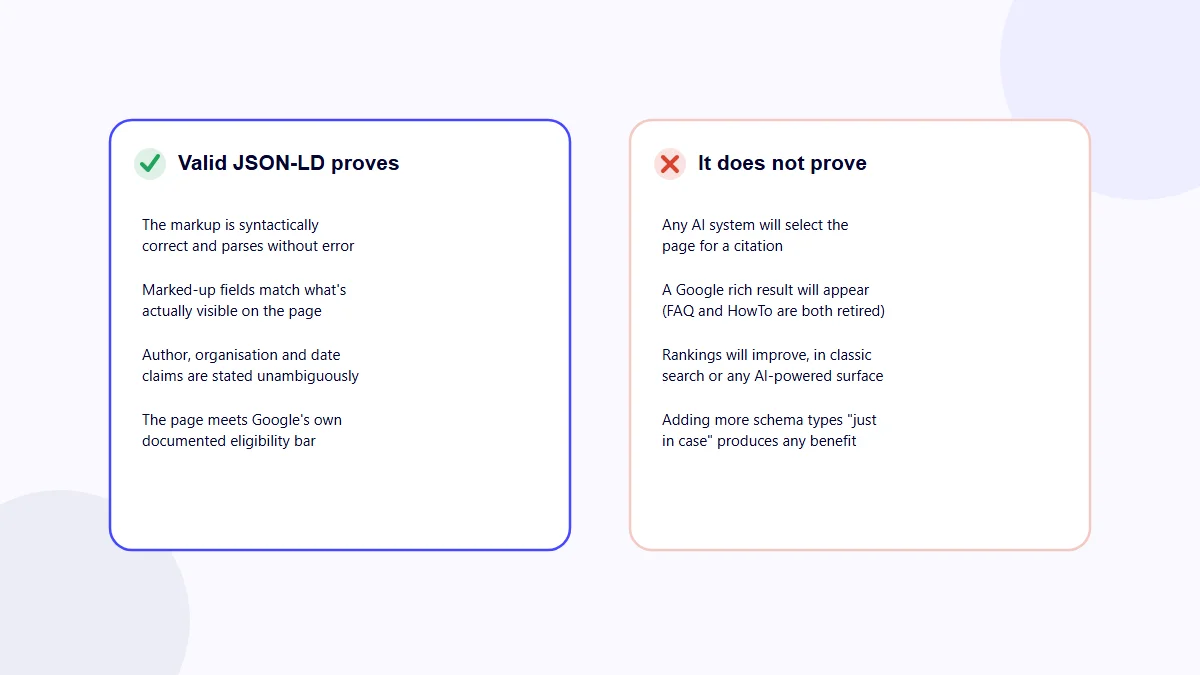
Every template above, implemented correctly, proves something real and checkable. None of it proves anything about what an AI system will do with the page.
| What valid, accurate JSON-LD proves | What it does not prove |
|---|---|
| The markup is syntactically correct JSON and parses without error | That any AI system will select the page for a citation |
| The marked-up fields match what’s actually visible on the page | That a Google rich result will appear, since several rich results (FAQ, HowTo) have been retired regardless of markup quality |
| An author, organisation or date claim is stated unambiguously rather than left for a reader to infer | That rankings will improve, in classic search or any AI-powered surface |
| The page meets Google’s documented eligibility bar for the properties it uses | That adding more schema types “just in case” produces a benefit of any kind |
This table stays deliberately consistent with the evidence reviewed in our structured data and AI citations article: Ahrefs’ 1,885-page study found no meaningful AI-citation uplift from adding schema to pages already being cited, and Google’s own AI Overviews and AI Mode documentation states directly that no special schema.org markup is needed to appear in those features. Nothing in this implementation guide changes that finding. What changes is a separate, narrower thing: whether your markup is correct, which is worth getting right on its own terms.
How to Validate Your JSON-LD Before Publishing
A JSON-LD block that looks right at a glance can still be invalid. The checks below catch different kinds of problems, in order of how early they catch them.
- Parse it as plain JSON first. Before worrying about which schema.org properties to use, confirm the text itself is valid JSON. In Python,
json.loads(my_jsonld_string)either succeeds silently or raises an exception naming exactly where it failed, for example an unescaped quotation mark inside a text value or a trailing comma after the last item in an array. This catches syntax errors a human eye tends to skim past. - Check it against Google’s Rich Results Test. Once the JSON itself is valid, Google’s own tool checks the specific properties it recognises for each type and flags anything missing or malformed. This is a Google-specific check, not a schema.org validity check, and the two can disagree: a property can be valid schema.org markup that Google’s tool doesn’t flag either way, simply because Google doesn’t currently use it for anything.
- Open the rendered page and confirm the script tag is actually there. Some CMS templates silently drop a schema block when a required field is empty, or duplicate it when a plugin and a manual edit both add one. Check the page source, not just the CMS editor, and confirm exactly one copy of each intended block is present.
- Cross-check every marked-up value against the visible page. A
datePublishedthat doesn’t match the visible byline date, or anauthor.namecrediting someone not named anywhere on the page, is a mismatch Google’s structured data guidelines treat as a real problem, independent of whether the JSON itself is valid.
Common Mistakes When Implementing JSON-LD
Stuffing author.name with extra text. Google’s own guidance says to use only the name, nothing else. Writing "Jordan Blake, Senior SEO Consultant" or "By Jordan Blake" into that single field is a frequent and easily avoided mismatch.
Letting dateModified go stale. A page that’s genuinely been updated but still carries its original dateModified value is a markup-content mismatch, the same category of problem as a date that doesn’t match the visible page at all.
Publishing two conflicting blocks for the same page. It’s normal to run one Article block and one FAQPage block together, but a CMS plugin adding its own Article schema alongside a manually inserted one, with two different dateModified values, is a genuine and common error, not a hypothetical one.
Marking up questions that aren’t actually visible on the page. FAQPage schema is meant to describe content a visitor can actually read. Markup built from a different, longer internal FAQ list than what’s rendered on the page is a mismatch between the structured data and the page it’s supposed to describe.
Treating a validator pass as the finish line. A block can be perfectly valid JSON, pass Google’s Rich Results Test, and still be pointless if it’s attached to a page where the marked-up facts, dates especially, simply aren’t true any more. Validity and accuracy are two separate checks; both matter.
FAQs
Do I need JSON-LD schema for a page to appear in AI Overviews or ChatGPT answers?
No. Google’s own documentation for AI Overviews and AI Mode states there is no special schema.org structured data required to appear in those features. Valid JSON-LD is a readiness signal, not an entry requirement for any AI surface.
Will adding FAQPage schema bring back the FAQ rich result in Google Search?
No. The FAQ rich result was retired from Google Search between May and June 2026, and Google removed its own documentation for the feature. FAQPage JSON-LD is still valid, parseable markup, but it no longer produces a visible Google rich result.
Is HowTo schema worth adding in 2026?
Generally not for the rich result itself. Google retired the HowTo rich result in 2023 and removed its documentation at the time. HowTo JSON-LD remains valid markup if a page is genuinely a sequential procedure, but it will not restore a Google SERP feature that no longer exists.
What is the fastest way to check my JSON-LD is valid before publishing?
Run the exact text through a JSON parser, such as Python’s json.loads(), before it goes live; a parser either accepts or rejects the syntax with no ambiguity. Follow that with Google’s Rich Results Test to check the specific properties Google’s own systems recognise for each type.
Does correct JSON-LD guarantee my page gets cited by an AI system?
No. Valid, accurate JSON-LD proves the markup is syntactically correct and matches the page’s visible content; it does not prove, and cannot prove, that any AI system will select the page for a citation. See our structured data and AI citations article for the evidence behind that distinction.
Can I put more than one JSON-LD block on the same page?
Yes, and it is normal to do so, for example one BlogPosting block and one FAQPage block on the same article. Each block needs its own complete, valid script tag; keep them free of duplicate or conflicting values for the same property, such as two different dateModified values.
Checking Your Own Pages
Whether structured data is present, valid and matches a page’s visible content is a page-level readiness check, the kind AI Rank Inspector’s automated audit reviews alongside its other signals. It can tell you whether the markup exists and parses correctly; it can’t tell you, and no tool honestly can, whether adding it will get a specific page cited by a specific AI system. For the broader readiness picture beyond schema alone, the GEO Audit Checklist and AEO Audit Checklist cover the rest of what’s worth checking on a page.
Getting JSON-LD right has a real, bounded job: stating facts about a page unambiguously so any machine reader, Google’s classic systems or an AI system’s retrieval pipeline, doesn’t have to guess them from prose. That’s worth doing properly regardless of the unresolved citation question, and it’s worth not overselling as something it was never going to be.